All pages
Powered by GitBook
1 of 7

Loading...

Loading...

Loading...

Loading...

Loading...

Loading...

Loading...

Project Assets

Project assets are the defined lists of objects that can be attached to tasks within a project. You can query these assets to assist in constructing more precise Task queries.

Get Users

Use this endpoint to query the list of Users on a project.

Get Subcontractors

Use this endpoint to query the list of Subcontractors on a project.

Get Folders

Use this endpoint to query the tree of Folders on a project.

Get Packages

Use this endpoint to query the list of Packages on a project.

Get Calendars

Use this endpoint to query the list of Calendars on a project.

Get Locations

Use this endpoint to query the list of Locations on a project.

Work Area API

This endpoint provides access to the Work Areas on Published Plans for a project.

Teams generating plans utilising Map Space Locations generate a unique related dataset of real-world work areas and schedule tasks. Teams can use this location data in any of their external GIS or analytics tools with the Work Area API.

The Work Area API has three components.

APIs

Data Model
  • Limits and Restrictions

  • You can access the Work Area API by querying the endpoint URL for your desired project and providing a valid Token.

    Finding your API URL

    As a Project Administrator, head to your project in the Aphex Planner app. From the Integrations page, the API can be enabled.

    This will uncover the API URL specific to that project. The URL structure will be;

    From the same location you sourced the API URL, a new Token can be created.

    To successfully authenticate your request to the API, set the Token in the Query String of the URL.

    The example below can be used by replacing the API account ID and Token using those retrieved in the earlier step

    Valid requests to the API will return a JSON response consistent with the API data model.

    The Work Area API Data Model contains the following objects;

    Object
    Example

    Work Area ID

    HEntifOafSu297hg3oj8.2IPGEecKYBdwrpxcwXCX

    Location Name

    Main Site

    Location Type

    The Work Area API has a small number of restrictions and limits to ensure the availability of the system and the security of customer data.

    • Token Management Restrictions: As covered in the Authentication section, requests to the API will only succeed if they follow the correct request structure and include both a valid URL and Token. Tokens are generated individually for a Project, by a user with Project Admin rights.

    • Token Validity Limits: Generated tokens have a maximum lifespan of 3 months to ensure that over time, project data is secure by default. On expiry, or at any time, new tokens can be generated for the project.

    • Publication Limit: To maintain system availability, a Publication Limit exists for the Work Area API. Successful API requests will return up to a maximum of five (5) of the most recent Publications of data.

    • Fair Use Policy: The API endpoint is designed to support periodic (usually weekly) requests from projects. Use of the service outside that threatens the availability of the service for other projects could result in a suspension of the service for the offending project.

    This feature is only available on Pro+ or Enterprise plans

    Overview

    Authentication
    https://app.aphex.co/work-areas/v1/<your_api_account_id>
    https://app.aphex.co/work-areas/v1/<your_api_account_id>/t/<your_token>

    Authentication

    Generating Tokens

    You cannot retrieve the token later, so be sure to save it in a secret manager. If you lose the token, you can generate a new one.

    Querying the API

    Data Model

    Limits and Restrictions

    Map Space

    Task ID

    2IPGEecKYBdwrpxcwXCX

    Task Name

    Build Wall

    Start

    2022-06-13 00:00:00+00:00

    End

    2022-06-14 00:00:00+00:00

    Duration

    2

    Shift

    day

    Owner Display Name

    Bruce Wayne

    Owner Email

    [email protected]

    Subcontractor

    Batman Ltd

    WBS Path

    12.2.3

    WBS Name

    Factories

    External ID

    Aiw9123

    Package Code

    W-203

    Package Name

    Internals

    Task ID

    2IPGEecKYBdwrpxcwXCX

    Key Task

    False

    Status

    Planned

    Notes

    Crane access at 10AM

    Secret Token

    Plan APIs

    This feature is in a closed beta phase and is available upon request only for Enterprise partners. Talk to us to learn more.

    Overview

    The foundation of the Aphex Planner data model are projects and tasks. Tasks reflect planned work and crucial properties such as subcontractors or shifts.

    For customers and partners wanting to build external or internal applications and workflows on top of planned tasks, we provide a broad set of endpoints that give access to real-time data from a Plan workspace.

    Typically use cases for these endpoints include;

    • Third-party platforms and products building integrations to Aphex

    • Internal customer teams using planned tasks as the trigger for internal apps or workflows

    Our APIs follow the essence of REST and all queries must be made via HTTPS to pass the endpoint security rules.

    Endpoints query rules and response structure can be accessed from the following page;

    Querying the Plan APIs

    Authentication
    Project Assets
    Tasks

    Tasks

    Project Tasks are the core object of Aphex Plan - this endpoint will return realtime Task data for a provided query.

    Get Tasks

    Use this endpoint to query Tasks on a project.

    Authentication

    To generate a session token, you must provide a valid Client ID and Client Secret.

    While in closed beta, you can obtain your API keys by contacting our Customer Success team.

    Generate Token

    Use this endpoint to generate a temporary Access Token

    Revoke Token

    Use this endpoint to revoke a previously generated Access token

    Published Plans API

    Overview

    This endpoint provides access to Published Plans for a project which can be a powerful way to establish a "cadence" based reporting routine (.e.g. comparing last week's performance against the prior week's) or the extraction and storage of historical plan data.

    By accessing the Published Plans, you can ensure that any measurement of the data is based on reviewed and agreed plans by the project team.

    The most common use cases of this endpoint are;

    • connection to Aphex-provided Power BI templates.

    • connection to Excel or Power BI to create custom-built reports across a project or series of projects.

    • consumption and storage via an ETL operation across one or many projects within a portfolio.

    The Power BI API has three components.

    • Query Parameters

    • Data Model

    You can access the API by querying the endpoint URL for your desired project and providing a valid Token.

    As a Project Administrator, head to your project in the Aphex Planner app. From the Integrations page the API can be enabled.

    This will uncover the API URL specific to that project. The URL structure will be;

    From the same location you sourced the API URL, a new Token created. Create a new Token and name it i.e. Project Dashboard Token 1

    You cannot retrieve the token later so you should save it in a secret manager. If you lose the token you can generate a new one.

    To successfully authenticate your request to the API URL, set the Token in the Authorization header of the request.

    This can be done three ways;

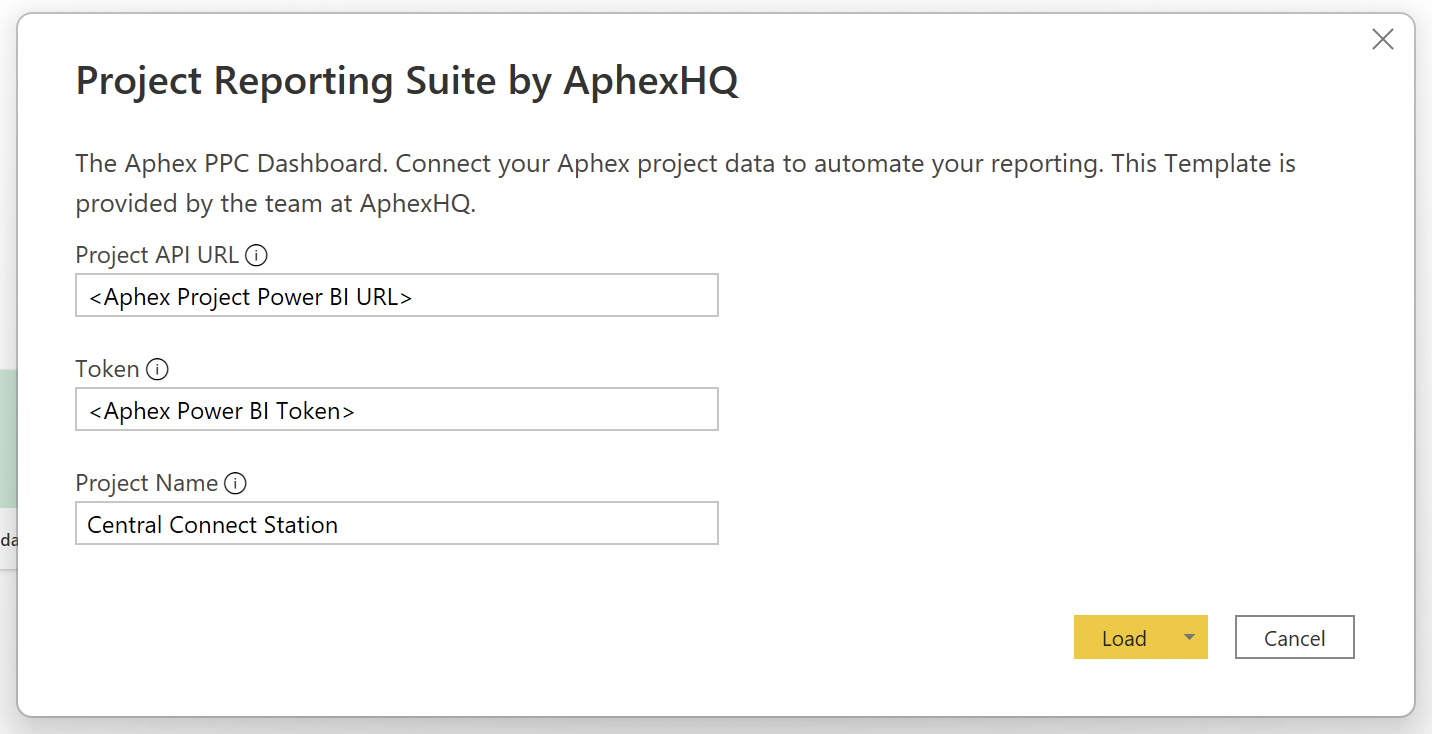
    1. If you are using an Aphex Power BI Template, simply paste the URL and Token into the setup modal

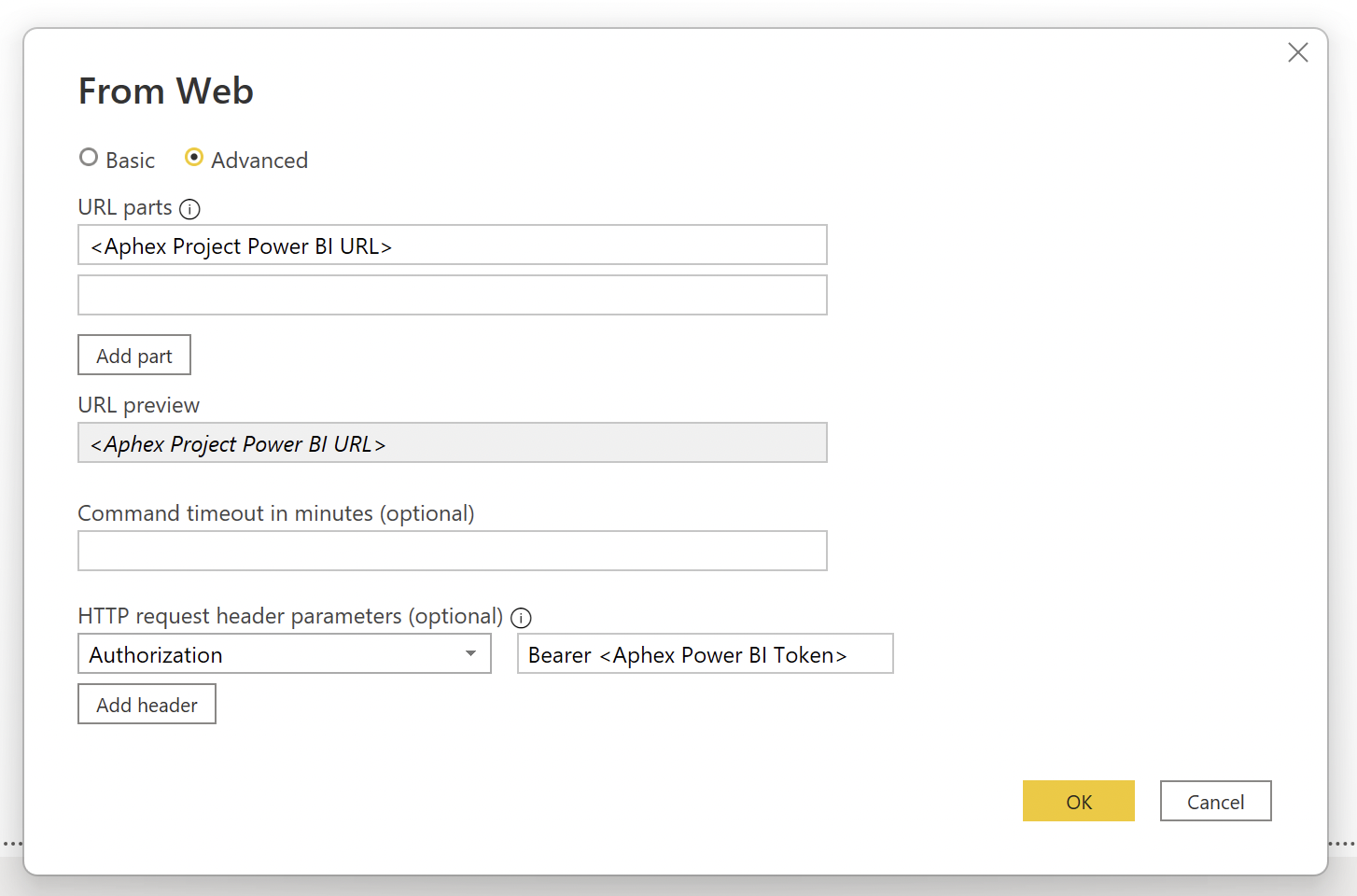
    1. If you are generating your own report in Power BI, set up a new "Web" source. From within the Advanced menu enter the URL and header request key of Authorization with Bearer followed by your Token as the value.

    1. If you are consuming the data in any other service construct a valid cURL request (example below).

    Query parameters allow you to adjust what the response shall contain. To enable projects of varying size to get the most out of this API within the single response limit of 32Mb the following query parameters are supported;

    Parameter
    Description

    Valid requests to the API will return a JSON response consistent with the API data model.

    The Power BI API Data Model contains the following objects;

    The Power BI API has a small number of restrictions and limits to ensure the availability of the system and the security of customer data.

    • Token Management Restrictions: As covered in section, requests to the API will only succeed if they follow the correct request structure and include both a valid URL and Token. Tokens are generated individually for a Project, by a user with Project Admin rights.

    • Token Validity Limits: Generated tokens have a maximum lifespan of 3 months to ensure that over time, project data is secure by default. On expiry, or at any time, new tokens can be generated for the project.

    • Limits: To stay within infrastructure limits and avoid paged responses on this end point, a response limit of 32Mb exists. If you experience a server error, please try reducing you data request by passing in query parameters. There is also a hard data history limit of 6 months.

    Blockers blockers=boolean

    This parameter will determine whether blockers are included in the response. If not provided, the response will default to true

  • Fair Use Policy: The API endpoint is designed to support periodic (usually weekly) requests from projects. Use of the service outside that threatens the availability of the service for other projects could result in a suspension of the service for the offending project.

  • https://app.aphex.co/power-bi/v1/<your_api_account_id>
    curl \
     -X GET \
     -H "Authorization: Bearer $<your_token>" \
     https://app.aphex.co/power-bi/v1/<your_API_account_id_here>
    Limit

    limit=number

    This parameter will determine how many of the historical published versions are returned. If not provided, the response will default to 5

    Status

    status=boolean

    This parameter will determine whether status events are included in the response. If not provided, the response will default to true

    Resource

    resource=boolean

    Setting Up Power BI

    If you are looking for the quick guide to setting up Power BI for your project, check out this guide here

    Authentication

    Finding your API URL

    Generating Tokens

    Secret Token

    Querying the API

    Query Parameters

    Note to enable responses greater than 32Mb please ask about an Enterprise plan.

    Data Model

    Publications

    The Publications are included within the response window. The API will, by default, return up to the five most recent Publications.

    Response

    • Publication Name

    • Publication ID

    • Publication Date

    Publication Summaries

    The Owner breakdown for each Publication shows ready status and related data

    Response

    • Owner Name

    • Owner Email

    • Ready Status

    • Ready Date

    • Missing Field

    • Clashes

    • Overdue Blockers

    Tasks

    The unique Tasks included in the response

    Response

    • Task ID

    • Project Name

    • Project ID

    Task Version

    The Versions of the Tasks included in each of the Publications along with all Task properties.

    Response

    • Task ID

    • Publication ID

    • Task Name

    • Start

    • End

    • Duration

    • Calendar

    • Shift

    • Owner Name

    • Owner Email

    • Subcontractor

    • Work Area ID

    • Location Name

    • Location Type

    • Folder Path

    • Folder Name

    • External ID

    • Package ID

    • Package Name

    • Parent ID

    • Milestone *

    • Status

    • Notes

    • Blockers

    • AssigneeEmails

    • AssigneeNames

    • Tags

    • TargetDate

    *Milestones will appear as Key Task [true / false] in the response

    Status

    All Status events on each of the Tasks at each of the Publications

    Response

    • Task ID

    • Publication ID

    • Date

    • Amount

    • Status Type

    • Reason

    • Created At

    • Creator Name

    • Creator Email

    Labour Resources

    All Labour assigned on each of the Tasks at each of the Publications

    Response

    • Task ID

    • Date

    • Publication ID

    • Resource ID

    • Resource Name

    • Resource Planned Quantity

    Plant Resources

    All Plant assigned on each of the Tasks at each of the Publications

    Response

    • Task ID

    • Date

    • Publication ID

    • Resource ID

    • Resource Name

    • Resource Category

    • Resource Planned Quantity

    Material Resources

    All Materials assigned on each of the Tasks at each of the Publications

    Response

    • Task ID

    • Date

    • Publication ID

    • Resource ID

    • Resource Name

    • Resource Planned Quantity

    • Resource Actual Quantity

    • Resource Unit

    Blockers

    All Blockers assigned on each of the Tasks at each of the Publications

    Response

    • Task ID

    • Blocker Due Date

    • Publication ID

    • Blocker ID

    • Blocker Name

    • Blocker Category

    • Blocker Status

    Limits and Restrictions

    Note to enable responses greater than 32Mb please ask about an Enterprise plan.

    Authentication
    Authentication

    This parameter will determine whether labour, plant and material assignments are included in the response. If not provided, the response will default to true

    get users

    get

    Get users

    Path parameters
    regionanyRequired

    gb | au

    projectIdanyRequired

    projectId

    Header parameters
    X-API-KeyanyRequired

    access token

    Responses
    200

    OK

    application/json
    afterstringOptional
    linkstringOptional
    displayNamestringOptional
    emailstringOptional
    idstringOptional
    401

    Unauthorized

    application/json
    messageanyOptional
    422

    Unprocessable Entity

    application/json
    500

    Internal Server Error

    application/json
    messageanyOptional
    get/{region}/v1/projects/{projectId}/users

    get subcontractors

    get

    Get subcontractors

    Path parameters
    regionanyRequired

    gb | au

    projectIdanyRequired

    projectId

    Header parameters
    X-API-KeyanyRequired

    access token

    Responses
    200

    OK

    application/json
    afterstringOptional
    linkstringOptional
    idstringOptional
    namestringOptional
    401

    Unauthorized

    application/json
    messageanyOptional
    422

    Unprocessable Entity

    application/json
    500

    Internal Server Error

    application/json
    messageanyOptional
    get/{region}/v1/projects/{projectId}/subcontractors

    get folders

    get

    Get folders

    Path parameters
    regionanyRequired

    gb | au

    projectIdanyRequired

    projectId

    Header parameters
    X-API-KeyanyRequired

    access token

    Responses
    200

    OK

    application/json
    afterstringOptional
    linkstringOptional
    codestringOptional
    idstringOptional
    namestringOptional
    parentIdstringOptional
    pathstringOptional
    401

    Unauthorized

    application/json
    messageanyOptional
    422

    Unprocessable Entity

    application/json
    500

    Internal Server Error

    application/json
    messageanyOptional
    get/{region}/v1/projects/{projectId}/folders

    get packages

    get

    Get packages

    Path parameters
    regionanyRequired

    gb | au

    projectIdanyRequired

    projectId

    Header parameters
    X-API-KeyanyRequired

    access token

    Responses
    200

    OK

    application/json
    afterstringOptional
    linkstringOptional
    codestringOptional
    idstringOptional
    namestringOptional
    401

    Unauthorized

    application/json
    messageanyOptional
    422

    Unprocessable Entity

    application/json
    500

    Internal Server Error

    application/json
    messageanyOptional
    get/{region}/v1/projects/{projectId}/packages

    get calendars

    get

    Get calendars

    Path parameters
    regionanyRequired

    gb | au

    projectIdanyRequired

    projectId

    Header parameters
    X-API-KeyanyRequired

    access token

    Responses
    200

    OK

    application/json
    afterstringOptional
    linkstringOptional
    idstringOptional
    namestringOptional
    typestring · enumOptionalPossible values:
    401

    Unauthorized

    application/json
    messageanyOptional
    422

    Unprocessable Entity

    application/json
    500

    Internal Server Error

    application/json
    messageanyOptional
    get/{region}/v1/projects/{projectId}/calendars

    get locations

    get

    Get locations

    Path parameters
    regionanyRequired

    gb | au

    projectIdanyRequired

    projectId

    Header parameters
    X-API-KeyanyRequired

    access token

    Responses
    200

    OK

    application/json
    afterstringOptional
    linkstringOptional
    idstringOptional
    namestringOptional
    typestring · enumOptionalPossible values:
    401

    Unauthorized

    application/json
    messageanyOptional
    422

    Unprocessable Entity

    application/json
    500

    Internal Server Error

    application/json
    messageanyOptional
    get/{region}/v1/projects/{projectId}/locations

    get tasks

    get

    Get tasks

    Path parameters
    regionanyRequired

    gb | au

    projectIdanyRequired

    projectId

    Query parameters
    startanyOptional

    YYYY-MM-DD formatted date

    finishanyOptional

    YYYY-MM-DD formatted date

    shiftanyOptional

    day | afternoon | night | 24hr

    ownerIdsanyOptional

    comma-delimited user IDs

    folderIdsanyOptional

    comma-delimited folder IDs

    packageIdsanyOptional

    comma-delimited package IDs

    locationIdsanyOptional

    comma-delimited location IDs

    calendarIdsanyOptional

    comma-delimited calendar IDs

    subcontractorIdsanyOptional

    comma-delimited subcontractor IDs

    assignedToIdsanyOptional

    comma-delimited user IDs

    fieldsanyOptional

    comma-delimited additional fields (assignees,wbs,package,parent,contractor,labourResources,plantResources,materialResources,location,workArea,progress,predecessors,successors,externalId,notes)

    Header parameters
    X-API-KeyanyRequired

    access token

    Responses
    200

    OK

    application/json
    afterstringOptional
    linkstringOptional
    displayNamestringOptional
    emailstringOptional
    idstringOptional
    idstringOptional
    namestringOptional
    typestring · enumOptionalPossible values:
    durationintegerOptional
    externalIdstringOptional
    finishstringOptional
    codestringOptional
    idstringOptional
    namestringOptional
    parentIdstringOptional
    pathstringOptional
    idstringOptional
    • Default task fields
    keyTaskbooleanOptional
    idstringOptional
    namestringOptional
    quantitynumberOptional
    idstringOptional
    namestringOptional
    typestring · enumOptionalPossible values:
    datestringOptional
    quantitynumberOptional
    datestringOptional
    quantitynumberOptional
    idstringOptional
    namestringOptional
    quantitynumberOptional
    unitstringOptional
    namestringOptional
    notesstringOptional
    displayNamestringOptional
    emailstringOptional
    idstringOptional
    codestringOptional
    idstringOptional
    namestringOptional
    idstringOptional
    namestringOptional
    categorystringOptional
    idstringOptional
    namestringOptional
    quantitynumberOptional
    amountintegerOptional
    datestringOptional
    namestringOptional
    typestring · enumOptionalPossible values:
    idstringOptional
    lagintegerOptional
    namestringOptional
    relationstring · enumOptionalPossible values:
    typestring · enumOptionalPossible values:
    shiftstring · enumOptionalPossible values:
    startstringOptional
    statusstring · enumOptionalPossible values:
    idstringOptional
    namestringOptional
    bboxnumber[]Optional
    geometryanyOptional
    idanyOptional
    Other propertiesanyOptional
    typestringOptional
    401

    Unauthorized

    application/json
    messageanyOptional
    422

    Unprocessable Entity

    application/json
    500

    Internal Server Error

    application/json
    messageanyOptional
    get/{region}/v1/projects/{projectId}/tasks

    generate token

    post

    Generate token

    Path parameters
    regionanyRequired

    gb | au

    Body
    clientIdstringOptional
    clientSecretstringOptional
    Responses
    200

    OK

    application/json
    accessTokenstringOptional
    expiresInstringOptional
    tokenTypestringOptional
    404

    Not Found

    application/json
    422

    Unprocessable Entity

    application/json
    500

    Internal Server Error

    application/json
    messageanyOptional
    post/{region}/v1/auth/token

    revoke token

    post

    Revoke token

    Path parameters
    regionanyRequired

    gb | au

    Body
    clientIdstringOptional
    clientSecretstringOptional
    tokenstringOptional
    Responses
    200

    OK

    application/json
    stringOptional
    404

    Not Found

    application/json
    422

    Unprocessable Entity

    application/json
    500

    Internal Server Error

    application/json
    messageanyOptional
    post/{region}/v1/auth/token/revoke
    GET /{region}/v1/projects/{projectId}/users HTTP/1.1
    Host: app.aphex.co/
    Accept: */*
    
    {
      "paging": {
        "next": {
          "after": "text",
          "link": "text"
        }
      },
      "results": [
        {
          "displayName": "text",
          "email": "text",
          "id": "text"
        }
      ]
    }
    GET /{region}/v1/projects/{projectId}/subcontractors HTTP/1.1
    Host: app.aphex.co/
    Accept: */*
    
    {
      "paging": {
        "next": {
          "after": "text",
          "link": "text"
        }
      },
      "results": [
        {
          "id": "text",
          "name": "text"
        }
      ]
    }
    GET /{region}/v1/projects/{projectId}/folders HTTP/1.1
    Host: app.aphex.co/
    Accept: */*
    
    {
      "paging": {
        "next": {
          "after": "text",
          "link": "text"
        }
      },
      "results": [
        {
          "code": "text",
          "id": "text",
          "name": "text",
          "parentId": "text",
          "path": "text"
        }
      ]
    }
    GET /{region}/v1/projects/{projectId}/packages HTTP/1.1
    Host: app.aphex.co/
    Accept: */*
    
    {
      "paging": {
        "next": {
          "after": "text",
          "link": "text"
        }
      },
      "results": [
        {
          "code": "text",
          "id": "text",
          "name": "text"
        }
      ]
    }
    GET /{region}/v1/projects/{projectId}/calendars HTTP/1.1
    Host: app.aphex.co/
    Accept: */*
    
    {
      "paging": {
        "next": {
          "after": "text",
          "link": "text"
        }
      },
      "results": [
        {
          "id": "text",
          "name": "text",
          "type": "five-day"
        }
      ]
    }
    GET /{region}/v1/projects/{projectId}/locations HTTP/1.1
    Host: app.aphex.co/
    Accept: */*
    
    {
      "paging": {
        "next": {
          "after": "text",
          "link": "text"
        }
      },
      "results": [
        {
          "id": "text",
          "name": "text",
          "type": "map"
        }
      ]
    }
    {
      "paging": {
        "next": {
          "after": "text",
          "link": "text"
        }
      },
      "results": [
        {
          "assignedTo": [
            {
              "displayName": "text",
              "email": "text",
              "id": "text"
            }
          ],
          "calendar": {
            "id": "text",
            "name": "text",
            "type": "five-day"
          },
          "duration": 1,
          "externalId": "text",
          "finish": "text",
          "folder": {
            "code": "text",
            "id": "text",
            "name": "text",
            "parentId": "text",
            "path": "text"
          },
          "id": "text",
          "keyTask": true,
          "labour": [
            {
              "id": "text",
              "name": "text",
              "quantity": 1
            }
          ],
          "location": {
            "id": "text",
            "name": "text",
            "type": "map"
          },
          "materials": [
            {
              "dailyActual": [
                {
                  "date": "text",
                  "quantity": 1
                }
              ],
              "dailyPlanned": [
                {
                  "date": "text",
                  "quantity": 1
                }
              ],
              "id": "text",
              "name": "text",
              "quantity": 1,
              "unit": "text"
            }
          ],
          "name": "text",
          "notes": "text",
          "owner": {
            "displayName": "text",
            "email": "text",
            "id": "text"
          },
          "package": {
            "code": "text",
            "id": "text",
            "name": "text"
          },
          "parent": {
            "id": "text",
            "name": "text"
          },
          "plant": [
            {
              "category": "text",
              "id": "text",
              "name": "text",
              "quantity": 1
            }
          ],
          "progress": [
            {
              "amount": 1,
              "date": "text",
              "name": "text",
              "type": "delay"
            }
          ],
          "relatedTasks": [
            {
              "id": "text",
              "lag": 1,
              "name": "text",
              "relation": "predecessor",
              "type": "start-start"
            }
          ],
          "shift": "day",
          "start": "text",
          "status": "planned",
          "subcontractor": {
            "id": "text",
            "name": "text"
          },
          "workArea": {
            "bbox": [
              1
            ],
            "geometry": null,
            "id": null,
            "properties": {
              "ANY_ADDITIONAL_PROPERTY": "anything"
            },
            "type": "text"
          }
        }
      ]
    }
    GET /{region}/v1/projects/{projectId}/tasks HTTP/1.1
    Host: app.aphex.co/
    Accept: */*
    
    text
    POST /{region}/v1/auth/token HTTP/1.1
    Host: app.aphex.co/
    Content-Type: application/json
    Accept: */*
    Content-Length: 41
    
    {
      "clientId": "text",
      "clientSecret": "text"
    }
    POST /{region}/v1/auth/token/revoke HTTP/1.1
    Host: app.aphex.co/
    Content-Type: application/json
    Accept: */*
    Content-Length: 56
    
    {
      "clientId": "text",
      "clientSecret": "text",
      "token": "text"
    }
    {
      "accessToken": "text",
      "expiresIn": "text",
      "tokenType": "text"
    }